FP&A software replaces spreadsheet-based planning with a connected system for budgeting, forecasting, reporting, and analysis, built on a single set of numbers pulled from your source systems.
Each tool on this list is framed as best for a specific type of team, anchored to Gartner Peer Insights ratings (or G2 for tools outside the Gartner market), with honest pros and cons. Prophix One leads the mid-market segment on platform breadth and independent analyst recognition.
The right choice depends on your company size, your existing tech stack, and whether you need planning alone or planning plus financial close and consolidation in one platform.
Financial planning and analysis (FP&A) software gives finance teams one place to budget, forecast, report, and analyse performance, instead of stitching the work together across disconnected spreadsheets and source systems. The right platform pulls actuals from your ERP, CRM, and HR systems, keeps a single version of the numbers, and frees the team to spend time on analysis rather than data preparation.
Every tool below is framed for the type of team it fits best, and each is anchored to third-party ratings from Gartner Peer Insights, or from G2 for tools outside the Gartner Financial Planning Software market.
Here are the 17 tools, evaluated against the criteria Gartner uses to define the Financial Planning Software market, rated with all-time Peer Insights data captured in July 2026, and ordered by use-case fit rather than a ranking.
Best FP&A software overview
#
Tool
Best for
Rating (source)
1
Prophix One™
Mid-market teams that want planning and close in one platform
4.4 / 5 (270), Gartner
2
Anaplan
Large-enterprise connected planning at scale
4.5 / 5 (374), Gartner
3
Workday Adaptive Planning
Teams already on the Workday ecosystem
4.7 / 5 (452), Gartner, Customers' Choice
4
Planful
Mid-market to enterprise integrated FP&A and close
4.4 / 5 (225), Gartner
5
Vena
Excel and Microsoft 365-native teams
4.6 / 5 (338), Gartner
6
OneStream
Enterprises unifying CPM on one platform
4.6 / 5 (378), Gartner
7
Oracle Cloud EPM
Organisations standardised on Oracle
4.8 / 5 (363), Gartner, Customers' Choice
8
Board
Planning plus operational and analytics use
4.5 / 5 (221), Gartner
9
IBM Planning Analytics
Enterprise power modelling
4.5 / 5 (252), Gartner
10
CCH Tagetik
Statutory, regulatory, and planning together
4.5 / 5 (278), Gartner
11
Pigment
Collaborative, driver-based modelling
4.7 / 5 (225), Gartner, Customers' Choice
12
Jedox
Modular planning with an Excel add-in
4.5 / 5 (240), Gartner
13
Abacum
Mid-market collaborative planning
4.6 / 5 (47), Gartner
14
Cube
Spreadsheet-native SMB and mid-market
4.5 / 5 (122), G2
15
Datarails
Excel-based reporting and consolidation
4.6 / 5 (359), G2
16
Jirav
SMB dashboards and forecasting
4.7 / 5 (191), G2
17
Mosaic (now Bob Finance)
High-growth SaaS finance teams
4.6 / 5 (217), G2
Ratings are all-time averages with review counts in parentheses, captured July 6, 2026. Gartner ratings are from the Financial Planning Software market on Gartner Peer Insights. Tools not covered in that market are rated with G2 data and marked accordingly. Each tool's block below also lists its G2 rating as a second independent source; the table stays on one scale for comparability.
How we evaluated these tools
We built this list around the Gartner Financial Planning Software market, which defines the category and rates vendors through verified customer reviews on Gartner Peer Insights. Every tool is rated with data from two independent sources rather than our own scoring: its Gartner Peer Insights rating, and its G2 rating. For the tools not covered in the Gartner market, we use G2 as the primary rating and say so. Every number on the page traces back to a named third-party source.
The criteria we used to frame each tool follow how buyers actually evaluate FP&A platforms:
Core planning: budgeting, forecasting, and scenario or driver-based modelling.
Reporting and analysis: dashboards, variance analysis, and management reporting.
Data integration: connections to ERP, CRM, HR, and other source systems.
Platform breadth: whether the tool covers planning alone or also financial close and consolidation.
Fit by company size and stack: SMB, mid-market, or enterprise, and how well it fits your existing systems.
All ratings are all-time averages captured on July 6, 2026, shown with the review count, and each tool's block lists both its Gartner and its G2 rating. Ordering reflects use-case fit for a mid-market finance buyer, not rating rank. A tool with a higher average rating may sit lower on the list because it serves a different segment, and the "best for" label tells you which team each one fits.
1. Prophix One™: Best for mid-market teams that want planning and close in one platform
Mid-market finance teams often run budgeting, forecasting, reporting, and consolidation across separate tools or spreadsheets, which means reconciling numbers before anyone can analyse them. Prophix One is a Financial Performance Platform that unifies budgeting, forecasting, reporting, and financial consolidation in one secure environment, with embedded AI, so the team works from a single source of truth. Prophix One Intelligence automates data preparation and surfaces anomalies for review: high-volume matching and preparation run automatically, exceptions route to the team, and finance keeps oversight of every result. It is a glass-box approach, where you can see how a number was produced rather than trusting a black box.
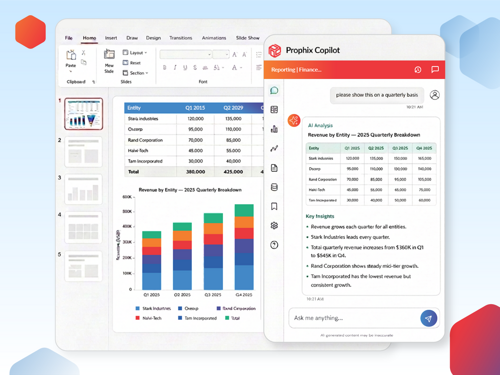
Key features: Budgeting, forecasting, and planning; financial consolidation; management and board reporting with dashboards; workflow and task management; Prophix One Intelligence, including Prophix One Agents, which turn questions into tables, charts, and variance commentary; and Prophix Copilot, a natural language interface used to delegate tasks, ask how-to questions, and run automated processes like report distribution or budget review.
Pros: Planning, reporting, and consolidation in one platform, so mid-market teams avoid running a separate close tool; established base of reviewers relative to newer entrants; strong independent recognition for customer experience and support (see Dresner, below).
Cons: As a full platform rather than a single-purpose tool, Prophix One rewards a proper implementation to get the most from it, and teams that only need lightweight, spreadsheet-style planning may find the breadth more than they need today.
Gartner Peer Insights: 4.4 / 5 from 270 reviews.
G2: 4.4 / 5 from 219 reviews .
Independent recognition: Named an Overall Leader in both the Customer Experience and Vendor Credibility models in the Dresner Advisory Wisdom of Crowds EPM Market Study, with a perfect Recommend score.
Pricing: Quote-based.
Customer outcome:
With Prophix One, View Point Health cut a three-hour overnight reporting cycle to under a minute, about 180 times faster. The behavioural health organisation, which serves four Georgia counties east of Atlanta, also gave 40 non-finance users live, self-serve access to financials they once waited on in monthly reports, and scaled from $50M to $70M without adding a financial analyst. Under CFO Eric Naughton, the lean, accountant-led finance team redirected that time from producing reports to analysis.
"With Prophix Copilot it essentially gives every one of my programme directors their own personal financial analyst. Prophix didn't just share an AI vision, they delivered on it."
Eric Naughton, CFO, View Point Health
2. Anaplan: Best for large-enterprise connected planning at scale
Anaplan is a cloud platform for enterprise planning, built to model and connect finance, supply chain, sales, and other operational areas in one place. Its calculation engine is designed for large, complex models that span departments.
Pros: Powerful, flexible modelling that scales to enterprise complexity; connects planning across functions, not just finance.
Cons: Reviewers note a meaningful learning curve and a reliance on skilled model builders, and cost that scales with the size of the deployment.
Gartner Peer Insights: 4.5 / 5 from 374 reviews.
G2: 4.6 / 5 from 461 reviews .
Pricing: Quote-based.
3. Workday Adaptive Planning: Best for teams already on the Workday ecosystem
Workday Adaptive Planning offers AI-assisted planning, forecasting, and reporting, and connects live data from ERP, HR, CRM, and other systems. It is a natural fit for organisations already running Workday HCM or Financials.
Key features: Planning and forecasting, reporting and dashboards, workforce planning, integrations across the Workday ecosystem and beyond.
Pros: Approachable interface; strong fit for existing Workday customers; a 2025 Gartner Peer Insights Customers' Choice.
Cons: Reviewers note that advanced reporting and modelling can require additional configuration, and that cost reflects the enterprise positioning.
4. Planful: Best for mid-market to enterprise integrated FP&A and close
Planful supports budgeting, forecasting, reporting, and consolidation, positioning itself across FP&A and financial close for mid-market and enterprise teams.
Key features: Structured planning and budgeting, consolidation, reporting, and workflow automation.
Pros: Covers both planning and close in one platform; structured processes that suit finance-led deployments.
Cons: Reviewers note a learning curve during onboarding and some limits in report flexibility for complex needs.
Gartner Peer Insights: 4.4 / 5 from 225 reviews.
G2: 4.3 / 5 from 501 reviews .
Pricing: Quote-based.
5. Vena: Best for Excel and Microsoft 365-native teams
Vena delivers planning on a managed database while keeping a native Excel interface, and integrates across Microsoft 365. It suits teams that want modern FP&A without leaving the spreadsheet environment they know.
Key features: Native Excel front end, centralised planning database, budgeting and forecasting, Microsoft 365 integration.
Pros: Familiar Excel experience lowers the adoption barrier; tight fit with the Microsoft stack.
Cons: Reviewers note that the Excel-centric model carries some spreadsheet constraints, and that very large models can affect performance.
Gartner Peer Insights: 4.6 / 5 from 338 reviews.
G2: 4.5 / 5 from 476 reviews .
Pricing: Quote-based.
6. OneStream: Best for enterprises unifying CPM on one platform
OneStream unifies financial and operational planning, close, consolidation, and reporting for large organisations that want one platform across corporate performance management.
Key features: Unified planning, financial close and consolidation, reporting, and analytics on one platform.
Pros: Enterprise-grade breadth and scalability; reduces the number of separate CPM tools a large finance function runs.
Cons: Reviewers note that implementation is a significant undertaking, and that the platform can be more than a mid-market team needs.
Gartner Peer Insights: 4.6 / 5 from 378 reviews.
G2: 4.6 / 5 from 160 reviews .
Pricing: Quote-based.
7. Oracle Cloud EPM: Best for organisations standardised on Oracle
Oracle Fusion Cloud Enterprise Performance Management (EPM) delivers planning, budgeting, forecasting, and financial close, with deep functionality for organisations invested in the Oracle ecosystem.
Key features: Planning and budgeting, financial close and consolidation, profitability and cost management, reporting.
Pros: Deep, mature functionality across EPM; a 2025 Gartner Peer Insights Customers' Choice; strong fit for Oracle-standardised stacks.
Cons: Reviewers note the breadth brings complexity, and that the platform delivers its best value inside the broader Oracle environment.
G2: Oracle Cloud EPM does not have a single clean G2 listing; its reviews are split across sub-products (for example, EPM Narrative Reporting at 4.0 / 5 from 21 reviews). Gartner Peer Insights is the reliable source for this platform.
Pricing: Quote-based.
8. Board: Best for planning plus operational and analytics use
Board unifies planning, analytics, and performance management on one platform, so finance and operations can model and analyse on shared data.
Key features: Planning and forecasting, business intelligence and analytics, operational planning across departments.
Pros: Flexible modelling combined with built-in analytics; useful when planning spans finance and operations.
Cons: Reviewers note a learning curve and an implementation effort to configure the platform to a team's needs.
Gartner Peer Insights: 4.5 / 5 from 221 reviews.
G2: Approximately 4.4 / 5. G2's Board listing overlaps with board-meeting governance software, so the review count is not reliable. Gartner Peer Insights is the reliable source for this platform.
Pricing: Quote-based.
9. IBM Planning Analytics: Best for enterprise power modelling
IBM Planning Analytics, built on the TM1 in-memory engine, is designed for organisations that need enterprise-scale modelling beyond connected planning.
Pros: Powerful modelling at enterprise scale; handles large, complex data volumes.
Cons: Reviewers note that the platform rewards technical skill to build and maintain, though they also point to interface improvements over time.
Gartner Peer Insights: 4.5 / 5 from 252 reviews.
G2: 4.4 / 5 from 257 reviews .
Pricing: Quote-based.
10. CCH Tagetik: Best for statutory, regulatory, and planning together
CCH Tagetik, from Wolters Kluwer, delivers corporate performance management across financial close and consolidation, planning, budgeting, and regulatory and ESG reporting, with AI assistance.
Key features: Financial close and consolidation, planning and budgeting, statutory and regulatory reporting, ESG and tax.
Pros: Strong for organisations with heavy statutory, regulatory, and disclosure requirements; unifies close and planning.
Cons: Reviewers note the depth brings configuration complexity and an involved implementation.
Gartner Peer Insights: 4.5 / 5 from 278 reviews.
G2: 4.3 / 5 from 72 reviews .
Pricing: Quote-based.
11. Pigment: Best for collaborative, driver-based modelling
Pigment is a modern business planning platform built for agility, with visual, driver-based modelling that connects finance, sales, supply chain, and HR.
12. Jedox: Best for modular planning with an Excel add-in
Jedox is an enterprise performance management platform for integrated planning, budgeting, forecasting, and analytics, with a modular design and an Excel add-in.
Key features: Integrated planning and budgeting, forecasting, analytics, and an Excel add-in for spreadsheet users.
Pros: Modular and flexible; the Excel add-in eases adoption for spreadsheet-first teams.
Cons: Reviewers note that setup and administration can be involved as models grow.
Gartner Peer Insights: 4.5 / 5 from 240 reviews.
G2: 4.3 / 5 from 188 reviews .
Pricing: Quote-based.
13. Abacum: Best for mid-market collaborative planning
Abacum is an FP&A platform that helps finance teams build collaborative models, consolidate and analyse real-time performance data, and streamline reporting for mid-market companies.
Key features: Collaborative financial modelling, real-time data consolidation, planning and reporting, approval workflows.
Pros: Modern, collaborative experience with a fast path to value for mid-market teams.
Cons: Reviewers note a smaller review base than the established platforms, and fewer deep enterprise features.
Gartner Peer Insights: 4.6 / 5 from 47 reviews.
G2: 4.8 / 5 from 143 reviews .
Pricing: Quote-based.
14. Cube: Best for spreadsheet-native SMB and mid-market
Cube is a spreadsheet-native FP&A platform that connects your existing Excel and Google Sheets models to source systems for planning, analysis, and reporting, without requiring code or consultants.
Key features: Works inside Excel and Google Sheets, source-system integrations, scenario planning, dashboards.
Pros: Keeps teams in the spreadsheets they already use; fast to implement for smaller finance functions.
Cons: Reviewers note that data modelling and scalability can become limiting as organisations grow, and that costs can rise as AI features are added even when they go unused.
G2: 4.5 / 5 from 122 reviews . Not rated in the Gartner Financial Planning Software market.
Pricing: Quote-based.
15. Datarails: Best for Excel-based reporting and consolidation
Datarails is an Excel-connected FP&A platform focused on financial reporting, consolidation, and month-end, keeping finance teams in the spreadsheet while automating data collection and analysis.
Pros: Works within Excel; strong for consolidation and reporting across many source systems.
Cons: Reviewers note a learning curve when setting up complex models, and performance lags with very large datasets.
G2: 4.6 / 5 from 359 reviews . Not rated in the Gartner Financial Planning Software market.
Pricing: Quote-based.
16. Jirav: Best for SMB dashboards and forecasting
Jirav is a driver-based FP&A platform built for small and mid-sized businesses and accounting firms, with three-statement forecasting, dashboards, and integrations to accounting and HR systems.
Key features: Driver-based three-statement modelling, forecasting, visual dashboards, integrations with QuickBooks, Xero, NetSuite, Intacct, and HR providers.
Pros: Strong driver-based forecasting and visual reporting; fast onboarding; publishes list pricing, which is unusual for the category.
Cons: Reviewers note a learning curve for advanced models, limits on multi-entity reporting and consolidation, and support response times that can lag at month-end.
G2: 4.7 / 5 from 191 reviews . Not rated in the Gartner Financial Planning Software market.
Pricing: Quote-based (Jirav also publishes list tiers on its site).
17. Mosaic (now Bob Finance): Best for high-growth SaaS finance teams
Mosaic is a strategic finance platform that consolidates data across ERP, CRM, HRIS, and billing systems, with strong SaaS metrics, headcount planning, and dashboards for high-growth companies. Note the change in ownership: HiBob acquired Mosaic in 2025 and now sells its capabilities as Bob Finance, integrated into HiBob's HCM suite. There is no public roadmap for a standalone Mosaic product, and existing customers are supported through the transition. A team shortlisting Mosaic in 2026 is evaluating a bundled HR and finance product, not a standalone FP&A tool.
Key features: Cross-system data consolidation, SaaS metrics and ARR reporting, headcount and workforce planning, dashboards, AI-assisted analysis, and integration with HiBob's HR platform.
Pros: Strong SaaS metrics and headcount planning; combining HR and finance in one stack is compelling for teams already on HiBob.
Cons: Reviewers note that buyers now evaluate a bundle rather than a standalone FP&A product, and point to some customisation and collaboration limits for complex reporting.
G2: 4.6 / 5 from 217 reviews . Not rated in the Gartner Financial Planning Software market.
Pricing: Quote-based.
What is FP&A software?
Financial planning and analysis (FP&A) software is a category of tools that finance teams use to budget, forecast, report, and analyse business performance on a single, connected set of numbers.
It pulls actuals from source systems such as your ERP, CRM, and HR platform, replaces manual spreadsheet consolidation with automated data preparation, and gives the team dashboards and reports to explain results and plan ahead. Broader platforms extend beyond planning into financial close and consolidation, which is where corporate performance management (CPM) and enterprise performance management (EPM) overlap with FP&A.
How to choose the best FP&A software
The best FP&A software is the one that fits your company size, your existing systems, and the scope of work you need it to cover. Use the criteria below to compare the tools above against your own situation rather than against each other in the abstract.
Scope: Do you need planning alone, or planning plus financial close and consolidation? Unified platforms such as Prophix One, Planful, OneStream, and Oracle Cloud EPM cover both. Planning-first tools such as Pigment, Abacum, Cube, and Jirav focus on the planning side.
Company size and complexity: SMB and high-growth teams tend to fit Cube, Jirav, and Mosaic. Mid-market teams fit Prophix One, Planful, Vena, and Abacum. Large enterprises fit Anaplan, OneStream, Oracle Cloud EPM, IBM Planning Analytics, and Board.
Existing stack: Workday Adaptive suits Workday customers, Oracle Cloud EPM suits Oracle customers, and Vena and Jedox suit teams that want to stay in Excel.
Modelling depth: Enterprises with complex, cross-functional models lean toward Anaplan, IBM Planning Analytics, and Board. Driver-based, collaborative modelling is a strength for Pigment and Jirav.
Regulatory needs: Heavy statutory, regulatory, and disclosure requirements point toward CCH Tagetik and the broader EPM suites.
Total cost and time to value: Most vendors are quote-based, so compare implementation effort and ongoing administration, not just license price.
AI and automation in FP&A software
Nearly every FP&A platform now advertises AI and automation, so the useful question for a buyer is not whether a tool has them, but what they actually do and how much control finance keeps. This section separates the two ideas, shows where they help in day-to-day work, and gives you a way to judge the claims.
Automation and AI are not the same thing
Vendors use the two terms together without drawing a line between them. Separating them makes the claims easier to evaluate.
Automation handles repeatable, rules-based work: importing actuals from the ERP, mapping accounts and entities, refreshing data, routing approvals, and distributing reports on a schedule. The rules are set once and run the same way every time.
AI handles interpretation and assistance: building forecast baselines from history, detecting anomalies, tagging the drivers behind a variance, and drafting first-pass commentary. Instead of following a fixed rule, it produces a suggestion that a person reviews.
A practical way to read a vendor's pitch: automation should remove repetitive work, and AI should speed up analysis. Finance stays accountable for the result in both cases.
Where AI and automation help today
The most useful applications in current FP&A software cluster around a few jobs:
Data preparation and integration: Automated data preparation pulls actuals from the ERP, CRM, and HR systems, maps them to a single chart of accounts, and flags gaps, so the numbers arrive ready to analyse rather than ready to clean.
Anomaly detection: The system reviews high volumes of transactions and surfaces the ones that look off, such as a miscoded expense, a duplicate, or an out-of-pattern balance, and routes those exceptions to a person to confirm.
Variance and root-cause analysis: AI tags the drivers behind a month's change (price, volume, mix) and explains the delta in plain language, pointing the analyst to what to investigate first.
AI-driven forecasting and scenarios: Machine learning builds a baseline forecast from seasonality and trend, which the team then adjusts with its own assumptions and overrides.
Reporting automation: The tool drafts commentary for board and monthly business review decks, checks figures across reports for mismatches, and distributes the final package.
Workflow automation and alerts: In-tool prompts or chat notifications surface an issue early, before a forecast is finalised, rather than after.
The pattern that fits a finance function is consistent across all of these: the software handles the high-volume, repeatable work and routes exceptions to the team, and finance keeps oversight of the output.
What automation actually changes
The value shows up in the day-to-day, not in the feature list. Done well, AI and automation mean less manual data preparation, fewer reconciliation errors, faster variance commentary, shorter budget and forecast cycles, and fewer last-minute reporting problems at close. That time moves from preparing numbers to analysing them.
A concrete example from a Prophix customer: Jamul Indian Village Development Corporation, which operates Jamul Casino, cut its budget cycle by 58%, from about six months to two and a half, after moving to Prophix One. The gain came from replacing manual, spreadsheet-based preparation with a connected, automated process.
How to evaluate AI in an FP&A tool
The general selection criteria are covered above. These questions are specific to the AI and automation claims, and they separate useful capability from a bolt-on feature:
Explainability: Can you see what the model used and why it reached a result? A glass-box approach, where the logic is visible, is safer for finance than a black-box output you cannot trace.
Human oversight: Can finance review, edit, approve, or reject every AI suggestion before it lands in a plan or a report? The team should own the decision, not inherit it.
Audit trail and governance: Does the tool log who changed what and when, and does it handle security properly, including SOC 2, personal-data handling, row-level permissions, and no data sharing you did not agree to?
Data permissions and quality: AI output is only as good as the data feeding it, so check how the tool connects to your systems and keeps that data clean and current.
Works across real workflows: Does the AI operate across your ERP, CRM, BI stack, and spreadsheets, and inside the actual planning process, or is it confined to one screen as a demo feature?
Where AI helps, and where finance stays in control
AI is best used to make a finance team faster and more consistent, not to replace its judgement. It accelerates the analysis and drafts the first version, and the team validates the result, applies the context the model does not have, and owns the number that goes to leadership. Two conditions decide whether it delivers. The data has to be clean and connected, because a suggestion built on messy inputs will not hold up. And the logic should be visible rather than a black box, so finance can stand behind the result. Used this way, AI shortens cycles and sharpens forecasts while accountability stays with the people who sign off on the plan.
For Prophix's fuller view of where finance automation is heading, see our Autonomous Finance page.
Discover why finance leaders choose Prophix One™ for FP&A.
FP&A software is a real investment, so it is worth being specific about the return rather than talking about value in the abstract. This section defines ROI for these tools in practical terms, gives you a simple way to weigh costs against gains, and flags the hidden costs that quietly erode payback.
What counts as ROI for FP&A software
Return comes in two forms, and both are real:
Direct financial gains: less labour spent on consolidation and reporting, fewer errors that require rework, and lower spend on the spreadsheet workarounds and one-off tools the platform replaces.
Indirect benefits: faster and better-informed decisions, more team capacity for analysis instead of data preparation, more accurate forecasts, and a single set of numbers leadership can trust.
The direct gains are easier to put on a spreadsheet. The indirect ones can matter more over time. A complete read on metrics and outcomes counts both, not just the line items that are simple to total.
A simple way to estimate ROI
You do not need a complex model. Weigh the costs against the gains over a defined period, such as the first year and then steady state.
Costs to include: the software subscription (quote-based for most vendors), implementation and configuration, training, and ongoing administration time.
Gains to include: hours saved across close, reporting, and forecasting; the value of errors avoided; and the business impact of faster or better decisions.
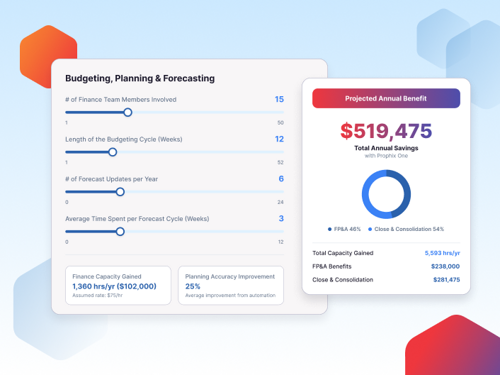
A practical starting point: estimate the finance hours spent today on manual data preparation, consolidation, and reporting, multiply by loaded cost, and compare that to the projected time after automation. Then add the harder-to-quantify gains, such as decision speed and forecast accuracy, as a second layer rather than forcing them into the same number.
How automation drives the return
Automation is the main return driver, not a nice-to-have. It reduces the manual work that consumes finance hours, limits the errors that create rework and late corrections, and frees the team to spend time on analysis that informs decisions. The measurable outcomes are the ones from the AI and automation section above: shorter budget and forecast cycles, faster variance commentary, and fewer reconciliation errors. For a concrete figure, see the Jamul example above, where a connected, automated process cut the budget cycle by 58%.
ROI depends on your starting point
Payback is not one-size-fits-all. It tracks your starting point and your complexity:
A smaller team replacing spreadsheets sees value quickly, because the before-state is manual and the automation gains land fast.
A larger organisation with complex, multi-entity planning can see a larger total return, but it arrives more slowly because implementation and adoption take longer.
Match the expectation to the situation. Both the right tool and the realistic payback depend on company size, existing systems, and whether you need planning alone or planning plus close and consolidation.
Hidden costs that affect ROI
The license is the visible cost. The ones that quietly reduce ROI are worth pricing in before you sign:
Implementation and configuration, which for complex platforms can be a major cost in its own right, sometimes rivalling the first-year license.
Training and onboarding for the finance team and any business users who will touch the system.
Ongoing administration to maintain models, integrations, and user access after go-live.
Process redesign, since the software delivers most when it changes how the team plans, not when it automates the old process unchanged.
A tool with a lower license can carry a higher total cost once these are included. That is why implementation effort and ongoing administration belong in the comparison, not just the subscription price.
Discover how Prophix One™ empowers high-performing finance teams with advanced FP&A software.
FP&A (financial planning and analysis): The finance function that budgets, forecasts, reports, and analyses performance to guide decisions.
CPM / EPM (corporate / enterprise performance management): Broader platforms that cover FP&A plus financial close, consolidation, and reporting.
Driver-based planning: Building forecasts from operational drivers, such as headcount or deal volume, rather than from prior-period figures alone.
Rolling forecast: A forecast that updates on a regular cadence and always looks a set number of periods ahead, rather than stopping at year-end.
Scenario planning: Modelling multiple sets of assumptions side by side to compare outcomes.
Financial consolidation: Combining results across entities into group financial statements, with adjustments such as intercompany eliminations.
Variance analysis: Comparing actuals against budget, forecast, or prior periods to explain the difference.
Workforce or headcount planning: Planning staffing levels and related costs as part of the financial plan.
Frequently asked questions
What is the difference between FP&A software and an ERP? An ERP records transactions and runs day-to-day operations. FP&A software sits on top of that data to plan, forecast, and analyse, using ERP actuals as an input rather than replacing the ERP.
What is the difference between FP&A and CPM or EPM software? FP&A covers planning, forecasting, reporting, and analysis. CPM and EPM are broader terms that add financial close, consolidation, and statutory reporting. Platforms such as Prophix One, OneStream, and Oracle Cloud EPM cover both planning and close.
How much does FP&A software cost? Most vendors price by quote, based on company size, number of users, modules, and data complexity. Some SMB-focused tools publish list tiers. Factor in implementation and ongoing administration, not just the license.
Do I still need FP&A software if my team lives in Excel? Several tools, including Vena, Cube, Datarails, and Jedox, keep an Excel or spreadsheet experience while adding a managed database, automated data collection, and version control, so teams can modernise without leaving the interface they know.
Which FP&A software is best for mid-market finance teams? Mid-market teams commonly evaluate Prophix One, Planful, Vena, and Abacum. Prophix One is built for mid-market teams that want planning, reporting, and financial consolidation in one platform rather than running separate tools.
Ready to see a unified platform in action?
If your mid-market team is running planning in one place and close in another, Prophix One brings budgeting, forecasting, reporting, and consolidation together so you work from a single set of numbers, with automation that keeps finance in control of every result. Book a demo or explore our Financial Planning and Analysis solution.