Account reconciliation software automates the matching of transactions across your general ledger, subledgers, and external sources like bank statements, so balances tie out and the books close faster with fewer errors.
Each tool on this list is framed as best for a specific type of team and anchored to third-party ratings: Gartner Peer Insights for the tools with real review depth, and G2 where the Gartner reconciliation market is thin. Prophix One leads the mid-market segment on platform breadth and its financial close standing, not a superlative.
The right choice depends on your company size, your ERP, your transaction volume, whether you need bank reconciliation or full balance-sheet reconciliation, and whether reconciliation should stand alone or connect to your close and consolidation.
Reconciliation is the control that proves the numbers are real. Before a company can close its books, every balance has to tie back to independent evidence, and doing that by hand across spreadsheets is where the close slows down and errors creep in. This guide compares 10 tools built to automate that work.
Our list shows every tool's honest rating, names the segment each one serves, and gives pros and cons so you can match a tool to your situation.
Best account reconciliation software tools for 2026
#
Tool
Best for
Rating (source)
1
Prophix One
Mid-market teams that want reconciliation tied to close and consolidation
4.4 / 5 (87), Gartner FCCS
2
BlackLine
Enterprise close and reconciliation at scale
4.7 / 5 (39), Gartner Recon
3
Trintech (Adra)
Mid-market high-volume transaction matching
4.4 / 5 (116), Gartner Recon
4
FloQast
Excel and accountant-native close
4.6 / 5 (1,411), G2
5
Numeric
AI-first modern reconciliation
4.8 / 5 (65), G2
6
OneStream
Enterprises unifying CPM on one platform
4.6 / 5 (160), G2
7
Oracle Cloud EPM
Organisations standardised on Oracle
4.8 / 5 (243), Gartner FCCS
8
HighRadius
AR and order-to-cash-driven high volume
4.9 / 5 (21), Gartner FCCS
9
QuickBooks Online Advanced
Small businesses wanting built-in reconciliation
4.5 / 5 (349), G2
10
Sage Intacct
Mid-market ERP with built-in GL reconciliation
4.3 / 5 (4,020), G2
Ratings are all-time averages with review counts in parentheses, captured August 2026. Source is labelled per tool: Gartner Recon is the Gartner Financial Reconciliation Solutions market; Gartner FCCS is the Gartner Financial Close and Consolidation Solutions market, cited for platform tools whose reconciliation is part of a rated close suite; G2 is used where the Gartner reconciliation market has too few reviews to be reliable. Each tool's block below lists its G2 rating as a second source.
How we evaluated these tools
We anchored every tool to independent third-party data rather than our own scoring, and we were deliberate about which source to use for which tool, because the reconciliation category is rated unevenly across Gartner.
Gartner's Financial Reconciliation Solutions market rates the dedicated reconciliation tools, but only the top few carry real review depth (Trintech at 116, BlackLine at 39, SolveXia at 11). Below that, most listings have a handful of reviews or none, which is not a reliable signal.
For the platform tools whose reconciliation is part of a broader close suite, we cite their rating in the Gartner Financial Close and Consolidation market, where those products are rated with depth, and we label it. Where neither Gartner market has meaningful depth for a tool, we use G2, where the same vendors carry a substantial review base. Every tool also shows its G2 rating in its block.
The criteria we used to frame each tool follow how buyers actually evaluate reconciliation software:
Matching automation: rules-based and AI matching, and the auto-match rate on routine transactions.
Integration depth: whether the tool connects at the trial-balance level or the transaction level, and which ERPs it supports.
Scope: bank reconciliation, full balance-sheet and GL reconciliation, or reconciliation tied to close and consolidation.
Controls and compliance: audit trails, segregation of duties, and SOX support.
Fit by company size and complexity: SMB, mid-market, or enterprise, and multi-entity or multi-currency needs.
Ordering reflects use-case fit for a mid-market finance buyer, not rating rank. A tool with a higher average rating can sit lower because it serves a different segment, and the "best for" label tells you which team each one fits.
Each tool below is framed for the team it fits best, with even-handed pros and cons and its third-party rating. The order reflects use-case fit, not rank.
1. Prophix One: Best for mid-market teams that want reconciliation tied to close and consolidation
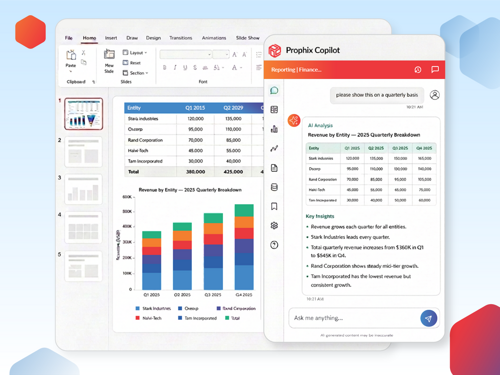
Many mid-market finance teams run account reconciliation in spreadsheets that sit apart from the close and the consolidation, which means reconciling the same numbers twice and hunting for support at quarter-end. Prophix One brings account reconciliation into the same platform as the financial close, consolidation, budgeting, and reporting, so a reconciled balance flows straight into the close rather than living in a separate tool.
Teams set materiality and variance thresholds to auto-certify low-risk accounts, assign and track exceptions with a full audit trail, and monitor reconciliation status across every account on one dashboard. Prophix One Intelligence automates data preparation and surfaces the items that need attention, with high-volume matching handled automatically, exceptions routed to the team, and finance keeping oversight of every result. It is a glass-box approach, where you can trace how a balance was reconciled.
Key features: Account reconciliation with configurable workflows, variance rules and materiality thresholds, exception assignment and audit trails, financial close and multi-entity consolidation, intercompany management, reporting, and Prophix One Intelligence for automated preparation and anomaly detection.
Pros: Reconciliation lives in the same platform as close and consolidation, so mid-market teams avoid a separate point tool; strong reviews for support and onboarding; recognised in Gartner's close and consolidation market (see below).
Cons: As a full platform rather than a single-purpose reconciliation tool, Prophix One rewards a proper implementation, and reviewers note the breadth means teams that only need standalone reconciliation may get more than they need today.
Gartner Peer Insights: 4.4 / 5 from 87 reviews in the Financial Close and Consolidation Solutions market, where Prophix One is recognised among the highest rated by peers for North America. Prophix is not listed in the standalone Financial Reconciliation market; its reconciliation is part of the Prophix One close suite.
G2: 4.4 / 5 from 219 reviews.
Pricing: Quote-based.
Customer outcome: Jamul Indian Village Development Corporation, which operates Jamul Casino, was an early adopter of Prophix One Account Reconciliation as part of moving its close onto Prophix One. The finance team cut its month-end close from 10 days to 7, a 30% reduction, and saved more than $15,000 in labour efficiency.
"Prophix One Account Reconciliation was a vital decision in our ever-evolving quest for expansion and having more efficient processes."
Yu Gnezil, Controller, JIVDC
2. BlackLine: Best for enterprise close and reconciliation at scale
BlackLine is one of the most established names in financial close automation, built for large enterprises with high transaction volumes and complex controls. Its reconciliation, transaction matching, and journal entry modules run on a platform designed for continuous accounting and SOX-grade audit trails.
Key features: Automated account reconciliation and transaction matching, journal entry, close task management, Verity AI for anomaly detection, extensive ERP integrations.
Pros: Category-defining enterprise platform with a proven track record; comprehensive controls and audit trails; deep ERP ecosystem.
Cons: Reviewers note that integration is often at the trial-balance level rather than transaction level, that implementation is a multi-month effort, and that the platform typically requires a dedicated administrator.
Gartner Peer Insights: 4.7 / 5 from 39 reviews in the Financial Reconciliation market.
G2: 4.5 / 5 from about 1,056 reviews.
Pricing: Quote-based.
3. Trintech (Adra): Best for mid-market high-volume transaction matching
Trintech's Adra suite is a cloud reconciliation and close platform for mid-market teams, with Adra Matcher for high-volume, multi-way transaction matching and Adra Balancer for balance-sheet reconciliation with auto-certification of low-risk accounts. Trintech carries the deepest review base in the Gartner reconciliation market.
Pros: Sophisticated matching for high-volume environments; modular path to close automation without a full enterprise system.
Cons: Reviewers note that navigation can be cumbersome, that the interface can slow on larger reconciliations, and that implementation can take several months for complex setups.
Gartner Peer Insights: 4.4 / 5 from 116 reviews in the Financial Reconciliation market.
G2: 4.5 / 5 from 332 reviews.
Pricing: Quote-based.
4. FloQast: Best for Excel and accountant-native close
FloQast was built by accountants for teams that live in Excel and Google Sheets. It centres on checklist-driven close management, with an AutoRec module that automates reconciliation matching while keeping teams in their familiar workpapers.
Key features: Close management checklists, reconciliation management, AutoRec automated matching (add-on), variance analysis, tight Excel and Google Sheets integration.
Pros: Accountant-friendly and quick to adopt for spreadsheet-based teams; strong close task orchestration and accountability.
Cons: Reviewers note that integration is at the balance level rather than transaction level, so teams often return to the ERP to investigate, and that meaningful automation requires the AutoRec add-on.
Gartner Peer Insights: Listed in the Financial Reconciliation market but with too few reviews to be reliable, so G2 is the source here.
G2: 4.6 / 5 from 1,411 reviews.
Pricing: Quote-based.
5. Numeric: Best for AI-first modern reconciliation
Numeric is a modern, AI-first close and reconciliation platform for accounting teams that want transaction-level visibility and fast implementation. It pulls every transaction from the ERP in real time, so teams drill into the entries behind a discrepancy without leaving the platform.
Pros: Fastest implementation among enterprise-grade tools (about a week); transaction-level drill-down; modern interface and strong reviewer sentiment on support.
Cons: Reviewers note fewer ERP integrations than the established platforms, since Numeric focuses on depth over breadth, and that it is a newer entrant with some features still maturing.
G2: 4.8 / 5 from 65 reviews. Not rated in a relevant Gartner market.
Pricing: Quote-based.
6. OneStream: Best for enterprises unifying CPM on one platform
OneStream aligns account reconciliation with financial reporting and consolidation on a single platform, so reported balances link directly to reconciled accounts and teams can drill from a financial report straight to the reconciliation behind it.
Key features: Reconciliation unified with close, consolidation, and reporting, drill-to-reconciliation from reports, risk reporting on the balance sheet, guided workflows.
Pros: Reconciliation and reporting live in one system, so there is no disconnect between reported balances and reconciled accounts; enterprise scalability.
Cons: Reviewers note that the broad platform can exceed what a team needing only reconciliation requires, and that enterprise implementation is a significant undertaking.
Gartner Peer Insights: 4.2 / 5 from 9 reviews in the Financial Reconciliation market (thin), so G2 is the primary source here.
G2: 4.6 / 5 from 160 reviews.
Pricing: Quote-based.
7. Oracle Cloud EPM: Best for organisations standardised on Oracle
Oracle Fusion Cloud EPM includes Account Reconciliation as part of its enterprise performance management suite, with automated reconciliations, transaction matching, and compliance-focused workflows tied to enterprise-wide governance. It fits organisations already invested in the Oracle ecosystem.
Key features: Automated reconciliation and transaction matching, compliance workflows, integration across the Oracle ecosystem, enterprise governance and reporting.
Pros: Deep, mature functionality; strong fit for Oracle-standardised stacks; enterprise governance and scale.
Cons: Reviewers note the breadth brings complexity, and that the platform delivers its best value inside the broader Oracle environment.
Gartner Peer Insights: 4.8 / 5 from 243 reviews in the Financial Close and Consolidation market. Oracle's reconciliation is a module of Fusion Cloud EPM; its standalone reconciliation listing is too thin to cite.
G2: Oracle Cloud EPM does not have a single clean G2 listing; reviews are split across products. Gartner is the reliable source here.
Pricing: Quote-based.
8. HighRadius: Best for AR and order-to-cash-driven high volume
HighRadius is an AI-driven autonomous accounting platform whose strength is the order-to-cash and AR data that feeds reconciliation and close. Its Autonomous Accounting product automates transaction matching and reconciliation for receivables-heavy enterprises at high volume.
Key features: AI-driven transaction matching and reconciliation, AR and order-to-cash automation, close management, analytics for high-volume environments.
Pros: Deep automation and analytics at very high transaction volumes; strong for receivables-heavy enterprises.
Cons: Reviewers note that implementation and configuration can be a significant lift, and that the platform is geared toward large organisations rather than smaller teams.
Gartner Peer Insights: 4.9 / 5 from 21 reviews for HighRadius Autonomous Accounting in the Financial Close and Consolidation market.
G2: 4.3 / 5 from 230 reviews.
Pricing: Quote-based.
9. QuickBooks Online Advanced: Best for small businesses wanting built-in reconciliation
QuickBooks Online Advanced includes built-in bank and credit card reconciliation within the accounting software many small businesses already use, with AI-assisted matching and automatic transaction categorisation. It suits smaller teams whose primary need is cash and bank reconciliation.
Key features: Built-in bank and credit card reconciliation, AI-suggested matches, bank feed automation, reconciliation reports, accountant access.
Pros: Affordable, familiar, and quick to set up; reconciliation lives inside the accounting system.
Cons: Reviewers note it is built for bank reconciliation rather than full balance-sheet reconciliation, with limited multi-entity support and a basic audit trail relative to dedicated tools.
G2: 4.5 / 5 from 349 reviews (QuickBooks Online Advanced). Not rated in a relevant Gartner market.
Pricing: From about $275 per month (published).
10. Sage Intacct: Best for mid-market ERP with built-in GL reconciliation
Sage Intacct is a cloud financial management and ERP platform for mid-market organisations, with GL account reconciliation built into a broader system that includes multi-entity management, dimensional reporting, and automation.
Key features: GL account reconciliation, bank reconciliation with a transaction assistant, multi-entity management, 150-plus prebuilt reports, dimensional reporting.
Pros: Reconciliation inside a full ERP; strong multi-entity support and reporting for growing organisations.
Cons: Reviewers note it is a GL and ERP rather than a dedicated reconciliation tool, so reconciliation is one feature among many, and that very large datasets can require additional processing time.
G2: 4.3 / 5 from about 4,020 reviews. Not rated in a relevant Gartner market.
Pricing: Quote-based.
Others worth a look, depending on your stack and needs: Oracle NetSuite and Multiview ERP for teams wanting reconciliation inside their ERP, Xero for small businesses outside the UK, Xelix for accounts-payable and vendor-statement reconciliation, and SolveXia, ReconArt, AutoRek, and Trintech Cadency for no-code, high-volume, or enterprise transaction reconciliation.
What is account reconciliation software?
Account reconciliation software automates the process of comparing internal financial records against independent sources, such as bank statements and subledgers, to confirm that balances agree before the books close. It replaces manual, spreadsheet-driven matching with rules-based and AI-assisted matching, pulls data from your general ledger, banks, and source systems into one place, and flags discrepancies as exceptions for review. Broader platforms extend reconciliation into the full financial close and consolidation, so a reconciled balance flows directly into reporting.
It helps to separate two related terms. Bank reconciliation matches your internal cash records against bank statements, verifying deposits, withdrawals, and fees. Account reconciliation is broader: it covers all balance-sheet accounts, including AR, AP, intercompany, fixed assets, prepaids, and accruals. Most teams start with bank reconciliation and add full balance-sheet reconciliation as they grow.
For related background, see these Prophix resources:
The features that separate a capable reconciliation tool are the ones that keep matching accurately, surface only what needs attention, and stand up to an audit. Look for these when you evaluate:
Automated matching: Rules-based and AI-assisted matching that clears the bulk of routine transactions automatically.
Integration depth: Connections to your ERP, banks, and subledgers, ideally at the transaction level so you can drill into a discrepancy without leaving the tool.
Exception handling: Unmatched items flagged, routed to the right reviewer with context, and tracked to resolution.
Materiality and auto-certification: Thresholds that auto-certify low-risk accounts so the team focuses on the ones that matter.
Audit trails and controls: A complete record of who prepared, reviewed, and approved each reconciliation, with segregation of duties for SOX.
Dashboards and reporting: A live view of reconciliation status and risk across every account.
Benefits of account reconciliation software
Moving reconciliation off spreadsheets turns a month-end bottleneck into a controlled, mostly automated process. The benefits reported most consistently:
Faster close: Automated matching moves reconciliation from days to hours, so the books close on schedule.
Audit readiness: Complete audit trails and documentation make compliance and audits less stressful.
Capacity for higher-value work: Time shifts from manual matching to analysis, so senior accountants review rather than prepare.
Stronger controls and risk management: Standardised workflows and segregation of duties reduce the risk of a wrong number reaching the financial statements.
Types of reconciliation
Reconciliation software supports several distinct processes, and the mix you need shapes which tool fits. The common types:
Bank reconciliation: Matching internal cash records against bank statements.
Balance-sheet and GL reconciliation: Tying every balance-sheet account back to supporting detail before close.
Intercompany reconciliation: Matching transactions between entities in the same group, essential for consolidated reporting.
Credit card and expense reconciliation: Matching corporate card activity to GL entries and expense reports.
Payment and high-volume transaction reconciliation: Matching payment processor or bank settlement data at scale, often daily.
Balance-sheet and intercompany reconciliation are where the close-oriented platforms earn their place, while high-volume transaction matching is where the dedicated matching engines lead.
Reconciliation in spreadsheets vs dedicated software
Most teams start reconciling in Excel, and for a small business with few accounts and one entity, that can be enough. Spreadsheets are flexible and familiar. The problem is they do not connect to your ERP, banks, and subledgers, so every close means exporting and matching data by hand.
That manual work introduces errors, breaks version control across a team, and slows as transaction volume grows, so reconciliation is a common reason the close runs late. Dedicated software addresses this with automated data consolidation, rules-based and AI matching, exception workflows, and audit trails, which is why teams move off spreadsheets as accounts, entities, and volume grow. The honest test: if your model is simple and single-entity, a spreadsheet can serve you for now; once you are chasing data across systems or preparing audited statements, dedicated software earns its cost.
How to choose the best account reconciliation software
The best account reconciliation software is the one that fits your company size, your ERP, and the scope of reconciliation you need. Company size is the most reliable first filter, because enterprises, mid-market teams, and small businesses have different needs.
Enterprises handle high volumes, multiple entities and currencies, and SOX requirements. They need transaction-level matching at scale, strong controls, and enterprise governance. BlackLine, OneStream, Oracle Cloud EPM, and HighRadius fit here.
Mid-market teams run leaner and want reconciliation that is finance-owned and connected to the close without heavy IT overhead. Prophix One, Trintech Adra, FloQast, and Numeric fit here.
Small businesses need effective bank and basic account reconciliation without complexity. QuickBooks Online Advanced, Sage Intacct, and a well-built spreadsheet fit here.
Across all three, weigh the same factors: integration depth (transaction level versus trial balance only), auto-match rate, implementation timeline and whether you need a dedicated admin, audit-trail and SOX support, multi-entity and multi-currency handling, and total cost including implementation and ongoing administration. Most vendors are quote-based, so compare the full cost, not just the licence. And a prerequisite that outranks features: clean, consistent ERP data, since AI matching amplifies bad data rather than fixing it.
Industry-specific requirements and use cases
What you reconcile matters as much as how much, and requirements vary widely by industry and business model. Company size sets the baseline, but the data you match and the regulatory weight behind it are what really change the shortlist.
Financial services and capital markets
Banks, brokers, and asset managers reconcile far more than the general ledger. They match cash movements, payment flows, securities positions, and custodian feeds across counterparties, custodians, and internal systems, which demands real-time reconciliation at high volume rather than a monthly cycle. The stakes are higher here: an incomplete or late match can create settlement risk and regulatory exposure under frameworks such as CASS for client-asset protection in the UK, EMIR for derivatives, MiFID II for transaction reporting, and FINRA TRACE for US fixed-income reporting. These environments need multi-way matching (three-way and four-way), custodian-feed and market-data connectivity, and custom workflows built around securities positions and daily cash movements, with auditability across every step. That is a distinct discipline from corporate close reconciliation. It is the domain of high-volume matching engines such as Broadridge, SS&C, AutoRek, ReconArt, and Xelix, with Trintech's Adra Matcher handling multi-way matching for teams that need it. Scope your shortlist to this lane if securities positions, custodian feeds, and regulatory frameworks like CASS and MiFID II are part of your day.
High-volume transaction businesses
Retailers, marketplaces, and payments platforms reconcile payment flows at scale: processor settlements, marketplace payouts, and bank deposits matched against internal sales and the general ledger. They need tolerance-based and many-to-many matching that holds performance as volume grows, plus custom workflows and exception management tuned to payment data. The goal is real-time reconciliation of payment flows through the period rather than a backlog at month-end. SolveXia and the dedicated matching engines fit here, and auditability of every matched and unmatched item still matters for these teams.
Multi-entity and multinational enterprises
Organisations with many legal entities and currencies need intercompany reconciliation, multi-entity support, and consolidation-aware matching, drawing operational data from an ERP or a finance data warehouse. Auditability and segregation of duties matter across every entity, and the reconciliation has to feed a consolidated close rather than sit beside it. This is where the close-oriented platforms earn their place: BlackLine, OneStream, Oracle Cloud EPM, and Prophix One handle reconciliation tied to multi-entity close and consolidation, with multi-entity support and operational data drawn straight from the finance data warehouse or ERP. Custom workflows and exception management here are about entity-level ownership and group-level visibility at the same time.
Mid-market and small business
Mid-market finance teams want reconciliation that is finance-owned, connected to the close, and quick to run each period, with custom workflows and exception management they can manage without heavy IT or capital-markets complexity. Prophix One, Trintech Adra, FloQast, and Numeric fit here. Small businesses focused on bank and basic account reconciliation are served by QuickBooks Online Advanced and Sage Intacct. Across every size and sector, custom workflows, exception management, and auditability are the shared requirements; what changes is the data you match, from cash movements and payment flows to securities positions, and the regulatory weight behind it.
Implementation best practices
Reconciliation software delivers most when the rollout is done well, and implementations tend to succeed or fail on preparation, configuration, controls, and adoption rather than on the software itself. Work through the stages below in order.
Get the data right before you migrate
Clean, consistent data is the single biggest predictor of a successful rollout, because rules-based and AI matching amplify bad data rather than fix it. Before any data migration, audit the chart of accounts for duplicate or unclear accounts, standardise transaction descriptions and reference fields so matching rules can find patterns, and clear any reconciliation backlog so the data migration moves clean records rather than old problems. Then handle integration with current systems: connect the ERP, banks, and subledgers, and confirm whether each integration works at the transaction level or only at the trial-balance level, because that determines whether your team investigates a discrepancy inside the tool or back in the ERP. Getting data migration and integration with current systems right up front is what turns the platform from a digital spreadsheet into an automated process.
Configure matching rules and workflows to your process
Configure the software around how your team actually reconciles. Set configurable matching rules and tolerance thresholds so routine transactions clear automatically, and use workflow configuration to route work the way your close runs. Define materiality thresholds so low-risk accounts auto-certify and the team sees only real exceptions. Then design exception management deliberately: decide how a reconciliation break is flagged, who each type of reconciliation break routes to, and how it is resolved and documented. Teams that leave exception management and workflow configuration as an afterthought end up with the same manual chasing the software was meant to remove.
Build controls in from day one
Reconciliation is a control, so the control framework belongs in the configuration from the start, not bolted on before an audit. Configure preparer and reviewer sign-offs, segregation of duties, and a complete audit trail for every reconciliation, so operational control is provable rather than asserted. A strong audit trail and clear operational control reduce regulatory exposure at audit, and for teams with high-volume or time-sensitive matching, they help contain settlement risk when a reconciliation break surfaces late.
Choose an implementation model and train the team
Pick an implementation model that fits your resources: phase the rollout, starting with the highest-volume or highest-risk accounts rather than switching everything at once, and decide whether finance or IT owns the ongoing configuration. Then budget real time for training team members, because adoption is won or lost here. Role-based training for preparers and reviewers, on both the software and the updated workflow, is what turns a sound implementation model into a process the team actually uses. Done in this order, most teams see value within the first close or two after go-live.
AI and the future of account reconciliation
AI is moving reconciliation from manual ticking and tying toward a process where the software takes the first pass and the team reviews the exceptions, but the useful question is not whether a tool has AI, it is what the AI does and how much control finance keeps.
The applications delivering value today cluster around a few jobs. Machine-learning matching learns from historical reconciliations to clear transactions that rules alone would miss, improving as it processes more data. Anomaly detection flags unusual entries, duplicates, or suspicious patterns for investigation. Intelligent exception routing assigns unmatched items to the right reviewer with supporting context. And AI-drafted variance explanations turn the write-up work into a review step.
The pattern that fits a finance function is consistent: the software handles the high-volume, repeatable matching and routes exceptions to the team, and finance keeps oversight of the result. Two conditions decide whether AI delivers. The data has to be clean and connected, because matching built on inconsistent ERP data will not hold up. And the logic should be visible rather than a black box, so finance can stand behind a certified balance. Used this way, AI shortens the close and strengthens controls while accountability stays with the people who sign off.
These are the terms that come up most when you evaluate account reconciliation software.
Account reconciliation: Comparing a general ledger balance against independent supporting evidence to confirm it is accurate.
Bank reconciliation: A subset of account reconciliation that matches internal cash records to bank statements.
Balance-sheet reconciliation: Reconciling all balance-sheet accounts, not just cash, before close.
Transaction matching: Automatically pairing individual transactions across two or more data sources.
Auto-certification: Automatically signing off low-risk accounts that meet defined criteria, so the team focuses on exceptions.
Exception: An unmatched or out-of-tolerance item flagged for human review.
Materiality threshold: The size below which a difference is treated as immaterial and does not require investigation.
Segregation of duties: Separating who prepares and who approves a reconciliation, a core internal control.
Continuous accounting: Spreading close tasks like reconciliation throughout the period rather than concentrating them at month-end.
Frequently asked questions
What is account reconciliation software?
It automates matching financial records across your general ledger, subledgers, and external sources such as bank statements, flagging discrepancies as exceptions and maintaining audit trails, so balances tie out and the books close faster.
What is the difference between account reconciliation and bank reconciliation software?
Bank reconciliation matches your internal cash records against bank statements. Account reconciliation is broader, covering all balance-sheet accounts including AR, AP, intercompany, and accruals. Bank reconciliation is one part of full account reconciliation.
How does account reconciliation software integrate with my ERP?
It connects to your ERP through APIs or middleware and pulls balances or transactions automatically. A key difference between tools is whether they integrate at the trial-balance level or the transaction level, which determines whether you can drill into a discrepancy inside the tool or have to return to the ERP.
How much does account reconciliation software cost?
Most vendors price by quote based on company size, users, and transaction volume, though some SMB tools publish tiers. Factor in implementation and ongoing administration, since enterprise platforms can carry significant setup cost and often need a dedicated admin.
Does account reconciliation software support SOX compliance?
Leading tools maintain complete audit trails with preparer and reviewer sign-offs, enforce segregation of duties, and provide exportable documentation for auditors, which supports SOX and GAAP or IFRS requirements.
Which account reconciliation software is best for mid-market teams?
Mid-market teams commonly evaluate Prophix One, Trintech Adra, FloQast, and Numeric. Prophix One is built for mid-market teams that want reconciliation connected to the close and consolidation in one platform rather than a separate tool.
The bottom line
The best account reconciliation software is the one that matches how your team works and what you reconcile, from a controller closing a mid-market book to a treasury desk matching securities positions. Each of the 10 tools here leads a real segment, and we show the ratings straight so you can weigh them against your own situation. We built this guide because reconciliation is where the close is won or lost, and the right tool, connected to the way you close, turns it from a month-end bottleneck into a control you can trust.
See a unified platform in action
If your team reconciles accounts in one place and closes the books in another, Prophix One brings account reconciliation, close, consolidation, and reporting together so a reconciled balance flows straight into the close, with automation that keeps finance in control of every result. See how JIVDC cut its month-end close from 10 days to 7 after adopting Prophix One Account Reconciliation. Book a demo or explore Account Reconciliation on Prophix One.